

For IT Services
IT Answering Service
An AI receptionist answers your business phone, takes down the support request, and texts you the details.
100% free. No sign up or credit card required.
Hear it answer an IT support call
Click the button to start a conversation with a receptionist trained for Evergreen Technology Solutions in Seattle. Pretend you are a customer and see how it handles whatever you ask.
Evergreen Technology Solutions
Seattle, WA · Managed IT Services, Cybersecurity Services, Cloud Migration & Management
- Answers with the business name.
- Asks what is wrong, where, and how soon they need help.
- Knows the hours and the service area.
- Texts the owner when the call ends.
It works in your browser, and you do not need to sign up.
Try saying
What it does on an IT support call
These are the calls IT providers get every week. The receptionist only uses the information in your agent profile, so it never guesses.
The caller asks
“Our whole office is down. Nobody can work.”
What the receptionist does
It takes the caller’s name, number, company, and what stopped working, then texts you the details right away. It does not try to troubleshoot.
The caller asks
“How much do you charge per workstation?”
What the receptionist does
It only quotes prices you add to your agent profile. If you add a per-workstation rate, it gives that rate. Otherwise it says you will call back with a price.
The caller asks
“Do you cover businesses in San Marcos?”
What the receptionist does
It checks the service area in your profile. If San Marcos is not on it, it tells the caller.
The caller asks
“Can a tech come out on Thursday morning?”
What the receptionist does
It takes the caller’s name, number, and the problem, then tells them you will call back to set a time. You get a text and a task.
The caller asks
“Can I talk to a real person?”
What the receptionist does
It offers a callback or takes a message. If you turn on call transfer, it sends the call straight to your phone.
The caller asks
A robocall about your Google listing.
What the receptionist does
It hangs up, and you do not get a text.
Say any of these to the demo receptionist and hear how it responds.
What you get

It answers every call, day and night.

It texts you the job details as soon as the call ends.

It answers many calls at the same time.

A recording and a summary are ready after each call.
It remembers repeat callers.

It keeps a list of people to call back.
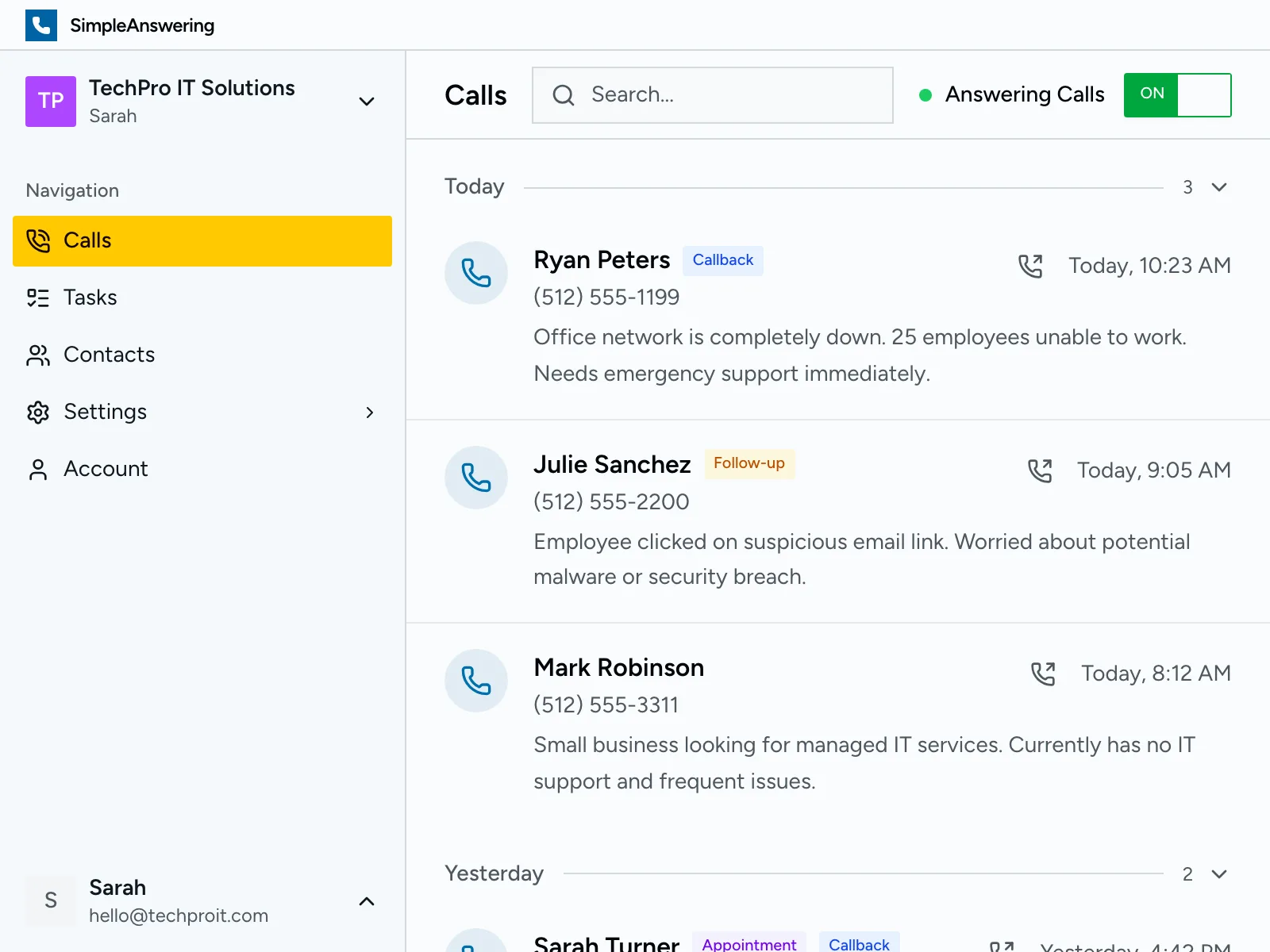
This is your call list.
How it works
 1
1Paste your website
The receptionist reads your site and learns your services, hours, and service area.
 2
2Check what it learned
Fix anything that is wrong and add the details you want it to know, like prices.
 3
3Forward your number
Send your calls to the receptionist. You get a text after each one.
What an IT support answering service does for your business
People who call an IT provider usually cannot work. The office network is down and 25 people are sitting at dark screens. An employee clicked a link in a strange email and now a popup will not close. A backup failed overnight and nobody knows if the data is safe. They want someone to pick up. If the call goes to voicemail, a new prospect calls the next provider on the list.
SimpleAnswering answers that call for you. It picks up on the first ring, gives your business name, and asks what is wrong. It collects the caller’s name, phone number, and company, and it notes which system stopped working and how many people it affects. When the call ends, you get a text and an email with everything the caller said.
Every call is recorded and saved to your dashboard, along with a written transcript and a short summary. This matters when a client says they reported the backup failure last week, or when you need the exact wording of the error message they read out. You can check what was said. It also helps when you hand a ticket to another tech on your team.
IT calls come in waves. A software update breaks email for every client that installed it. A storm knocks out power, and every office calls when the servers do not come back. One person can only take one call at a time, but SimpleAnswering answers every call at once. No caller hears a busy signal, and no caller goes to voicemail.
After each call, the system creates a task with what needs to happen next. A password reset shows up on your list next to a network outage and a request for a managed services quote. Repeat callers are matched to their past calls, so you see the client’s history before you dial. You decide who to call back first.
The receptionist only uses the information in your business profile. It knows your services, your support hours, and the area you cover. It quotes prices only when you add them. It does not troubleshoot or give technical advice. If a caller asks something it cannot answer, it takes a message and lets you decide. Setup takes a few minutes: paste your website, check what it learned, and forward your number.

I run a 3-person MSP and we were losing new leads because nobody answered when we were all on-site. Last quarter we picked up 8 new managed services contracts directly from calls the AI handled while we were at client offices.
David L.
Owner, TechForward IT Solutions · Minneapolis, MN
Questions IT providers ask
- Is an AI answering service better than a live receptionist for an IT services company?
- AI handles what a single receptionist cannot: simultaneous calls, after-hours coverage, and holiday availability without overtime. When a ransomware scare hits and five clients call at once, every caller gets an immediate answer. It captures detailed technical information from every caller and never puts anyone on hold. It works best alongside your existing team or as a complete phone solution for smaller IT shops.
- What happens when a client calls because their entire office network is down and employees cannot work?
- Your receptionist assesses the scope by asking how many users are affected, whether it is the internet or internal servers, and whether any work can continue. It flags the call as critical and sends you an instant alert with the error details and client contact info so your team can begin troubleshooting within minutes. You call back already knowing the scope instead of wasting time on basic questions.
- Can an IT answering service collect enough technical details for your team to start troubleshooting?
- Yes. It captures the problem description in the caller's own words, what they have already tried, which systems are affected, any error messages on screen, and how many people are impacted. Your techs get a structured support request instead of a vague voicemail that says "the computer is broken." They start fixing, not asking.
- Does the answering service for IT companies work after hours, weekends, and holidays?
- Every call is answered 24/7/365, including nights, weekends, and every holiday. IT emergencies do not wait for business hours. A server crash at 2 AM on a Saturday needs the same response as one at 10 AM on a Tuesday. Your AI receptionist picks up every time, captures the details, and alerts you so you can respond based on urgency.
- How long does it take to set up an answering service for my IT services company?
- Under two minutes. Paste your website URL and the AI learns your services, support tiers, hours, and service area automatically. You can customize the questions it asks — like whether to collect error messages or ask which system is affected — and add specific instructions before going live. No phone system changes or contracts required.
- Will my clients know they are talking to an AI receptionist?
- The voice sounds natural and professional, not robotic. It asks relevant follow-up questions about their issue, handles interruptions gracefully, and adapts to each conversation. Most clients simply appreciate that someone answered the phone at 11 PM on a Friday when their email server went down, instead of getting sent to voicemail.
Hear it answer an IT support call
100% free. No sign up or credit card required.