

An after-hours answering service
that answers while you sleep
You set the hours your receptionist answers. It picks up inside those hours, answers questions about your business, and takes the caller's details. You get an email when the call ends. You can switch on text alerts too.
Free to build and test, no card. Setup in 2 minutes.
What is an after-hours answering service?
An after-hours answering service answers your phone at night, on weekends and on holidays. Someone picks up, answers the caller's questions, and writes down what they want. You read it in the morning. The old version of this was a call center full of operators. This one is an AI receptionist. It answers every call you send it, and nobody waits on hold. Setup starts with your website. You paste your website address, and your receptionist reads the site. It learns your services, your hours, your service area, and your prices. The scan takes about 2 minutes. Then you read back what it learned and fix any line that is wrong. When the wording looks right, you claim a phone number. You can take a free local number, or forward the number you already use. Your callers keep dialing the same number they always have.
- It answers nights, weekends and holidays.
- Paste your website address. There is no form to fill in.
- Keep your number, or take a free local one.
Set the hours it answers, or leave it on 24 hours a day
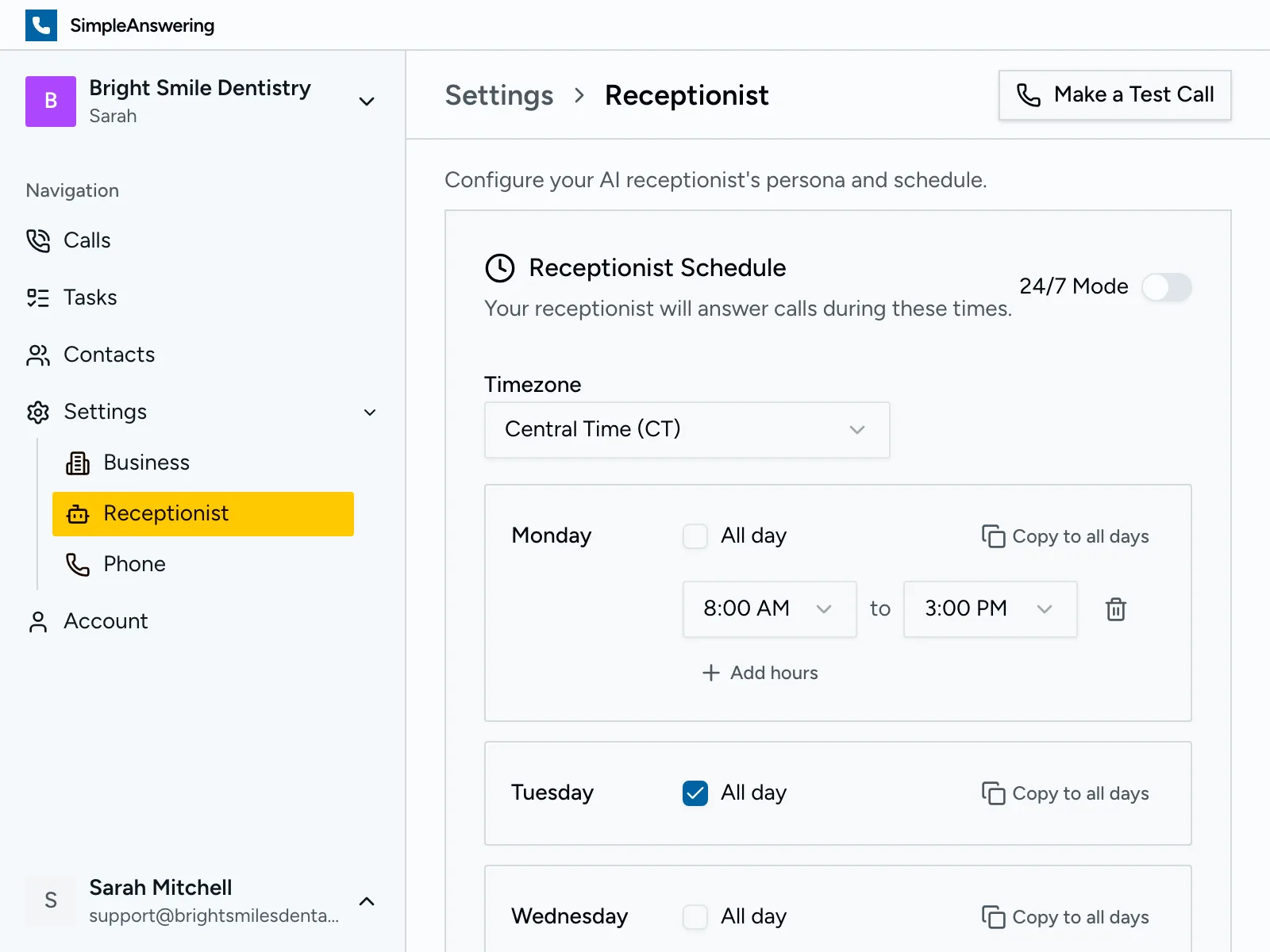
You choose the hours your receptionist answers. The hours you set are the hours it picks up. Each day runs on its own, from midnight to midnight. A night is two entries, not one. Set Monday to answer from 6pm to midnight. Then set Tuesday from midnight to 8am. Do that for each night you want covered. A weekend is easier. Set Saturday and Sunday from midnight to midnight. The simplest setup of all is 24 hours a day, seven days a week. The hours follow your timezone, so a call at 9pm is 9pm where you are. You can pause it at any time. If you are home and want the calls yourself, turn it off. Turn it back on when you go to bed. The change takes effect right away, from your phone.
- The hours you set are the hours it answers.
- Each day runs on its own, so a night takes two entries.
- Pause it and take the calls yourself, any time.
It answers as your business, not a call center
A call center operator reads your name off a screen. They cannot tell a caller whether you work on tankless water heaters. Your receptionist can, because it read your website first. What it knows sits in the knowledge base. That is a list of plain sentences you write yourself. Night callers ask a narrower set of things, so write for them. "We charge a call-out fee after 8pm." "We can get there in the morning, not the same night." "If you smell gas, hang up and call the gas company." It answers from those notes in its own words. You never write a phone script. Change the after-hours fee at 9pm and the next caller hears the new number. It also answers with your business name. A caller at 10pm hears your business name, not a call center.
- It answers from your own notes, not a script.
- Change a price or a service in one line.
- It answers with your business name.
Ask every night caller the questions that matter
At 7am a name and a phone number leave you guessing. You do not know the address, and you do not know how bad it is. Lead questions settle that while the caller is still on the line. You type what you want asked, in your own sentences. Your receptionist puts them to every caller it picks up overnight. The answers come in that call's summary email. That email arrives right after the call ends. The feature ships switched off, so turn it on first. A few examples sit in the box. "Ask what the thermostat reads." "Find out if the water is still running." "Get the zip code and the street." "Ask whether anyone is in the building right now." Nothing needs a label and nothing needs a set format. At 6am you read them and pick the first job. A zip code tells you which 2am job sits on your way. The water answer tells you which one holds until Monday.
- Type the questions yourself, in plain sentences.
- Your receptionist asks them on every night call.
- The answers come in the summary email for that call.
Urgent calls get marked. The rest wait until morning
Your receptionist puts a label on every call after it ends. The labels are urgent, lead, pricing, callback, complaint, information, spam and voicemail. A burst pipe at 11pm gets the urgent label. A question about your rates gets the pricing label. In the morning you open the calls list and tap urgent. Now you see only those calls. Tap lead and you have your callback list for the day. The label sorts your calls. It does not set off an alarm. The email for an urgent call looks the same as the email for any other call. If you want a caller put through to a person during the night, set an on-call number for transfers. Search works across every call too. Type a street name, a last name or a part number. The call comes back with its transcript and its recording.
- Your receptionist labels every call after it ends.
- Filter the calls list by label, including urgent.
- The alert is the same for every call, urgent or not.
Put a person on the line when it's a real emergency
At 2am the question is not whether to answer. It is whether to wake you up. Set an on-call number, and your receptionist transfers the caller to you. Two things set that off. A caller who asks for a real person gets one. So does a caller who loses patience on the line. Your cell rings, and the caller is already on it. The transfer carries no notes. Ask the caller what is wrong yourself. On the nights you are not on call, clear the number. Your cell stays quiet. Your receptionist takes the details instead: the name, the number, and what is wrong. Those reach you by email, and they are waiting at 6am. If you and a partner trade the on-call phone, change the number when you hand it over. It applies from the next call.
- Set an on-call number and it transfers the caller to your cell.
- Clear the number on the nights you are not on call.
- With no number set, it takes a callback and emails it to you.
Wake up to the whole call, not a missed number
You get an email as soon as the call ends. It carries the summary: who called, what they wanted, and what they asked you to do. If the call came in at 2am, the email is waiting when you get up. You can switch on text alerts as well, and add a mobile number for them. Text alerts stay off until you turn them on. In your account you get more than the summary. The full transcript sits under it, word for word. The recording is there too, if you want to hear how the caller sounded. That matters when a caller says they gave your receptionist the gate code. You open the call and read what was actually said. Starter covers one receptionist and one login. On the larger plans you can add the person who shares the on-call phone.
- An email when the call ends, with the summary.
- Switch on text alerts and add a mobile number.
- Full transcript and recording in your account.

How much does an after-hours answering service cost?
Night coverage starts on the Starter plan, at $29 each month. 150 minutes of calls are included. Go past that and each extra minute is $0.55. On the included time that lands near 19 cents per minute. Overnight call centers want $2 to $3 for that same minute, plus their own monthly fee. Nothing here costs more after dark. Sunday at 2am is billed like Tuesday at 2pm. Holidays carry no surcharge either. The other route is to put a person on nights. A full-time receptionist runs $3,000 a month and up. That pays for 40 hours out of the 168 in a week. The hours it leaves uncovered are mostly nights and weekends. Nothing here locks you in. Billing runs month to month, and one click ends it.
- $29 each month, and 150 minutes come with it.
- Extra minutes are $0.55 each, billed only when used.
- Sunday at 2am is billed like Tuesday at 2pm.
HVAC, property management and law firms
Night calls look different in every trade. An HVAC company gets no-heat calls in January, and those callers will not wait until Monday. Your receptionist asks what the thermostat reads and whether the unit runs at all. You wake up knowing which call to take first. Property managers get the burst pipe and the lockout. The caller is a tenant, not the person who pays you. Your receptionist asks which unit and which building, then writes it down. A law firm gets calls from people who were just arrested or served. That caller hires the first office that picks up. Your receptionist takes the details, and it puts the caller through if you are on call. We wrote a page for each of these three trades. Each page covers the calls that trade gets at night. It also covers the questions worth asking on those calls.
- HVAC: no-heat calls, and the questions to ask at 2am.
- Property management: tenant calls, with the unit and the building.
- Law firms: night callers who hire the first office that answers.
The Cost of Missing After-Hours Calls
A caller at 9pm wants an answer tonight. If nobody picks up, they can dial the next number on the list.
You can work this out with your own numbers. Start with what an average job pays you. Count the calls you miss in a month. Drop the ones you would not have won anyway. Multiply the calls that are left by the job value. That figure is what the missed calls cost you.
Stop Missing After-Hours Calls
Get coverage 24 hours a day, set up in 2 minutes. Free to build and test, no card.
No credit card required·Setup in 2 minutes·Cancel anytime